IT Consulting | IT Support | Managed Services | New Jersey Computer Support Services

Surveillance System Features

Surveillance System Features:
- Free Site Survey - (request a quote)
- Live Remote Monitoring
- Motion Detection Recording & Notification
- Analog to Digital Conversions
- Point of Sales Integration
- Digital Pan/Tilt/Zoom Controls, Infrared Cameras
 IP Camera Network IP Camera Network |
Quote Request |
Point of Sales Surveillance |
Smart Video Surveillance |
ICS Enterprise Video Server - Digital Video Recorder
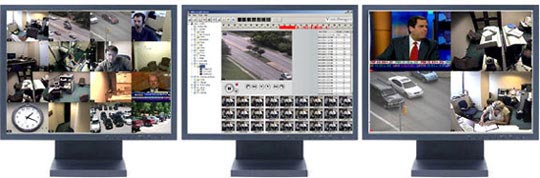 |
Highly scaleable DVR Software, from Small Business to Medium/Large Business. This unique peer to peer software design supports 32 analog or 32 IP cameras per server, with no limit on the number of servers.
Uses your existing CCTV Analog Cameras or IP Cameras
No special cameras, converters or cables are necessary. Connect up to 16 of your existing Analog cameras and up to 16 IP Cameras, install the software, and have all the features and benefit of a DVR, plus much more.
Hybrid Approach - Analog and IP Cameras
Integrates IP cameras into their existing analog based system, the industry has offered few options except to convert the analog signal to digital with a $400 per single channel camera converters. By utilizing IP Server you can seamlessly integrate IP and Analog cameras. By using the IP Server, you can add the IP camera to the existing network and the IP Server will capture the stream and store the video in the same manner the Video Server stores analog cameras. To view the live or recorded video from the IP cameras, use the Network Client or Web Client which allows you to mix and match IP and Analog cameras from different servers on the same display. You can use the layout setup feature to create saved layouts mixing cameras from IP and Analog servers anywhere on your network.
Network Client & Web Client
Used to view live or recorded video from computers on your LAN. And benefit of being able to connect to multiple servers at the same time.
Web Client allows you to view live or recorded video from anywhere with a standard browser with no software or plug-in to load. You can view a single camera or select up to 32 different cameras to view simultaneously. You can control PTZ cameras and playback recorded video.
Central Monitoring Station
Used to view live video from multiple cameras located on multiple servers. Designed to operate on PC's with multiple monitors and allows you save multiple layouts. You can view the motion log, control PTZ cameras or listen to audio recorded from the server. In addition, you can manage server settings including frame rates and image sizes.
Central Monitoring Station
The Archiver is a standalone application that helps you manage recorded video. Allows to recompress or trim the original AVI files to save disk space.
Health Monitor queries each of your servers on a regular basis to ensure server uptime and reporting of any issues affecting the servers. Can be configured to send emails and thresholds have been exceeded.
Enterprise Manager
The Enterprise Manager allows you to manage multiple servers from a centralized location. Can backup databases, configure the server settings, adjust camera settings including frame settings and motion detection thru whole enterprise of DVR's.
| IP Camera Network Diagram |
Request a Quote |



Why Choose Us?
- Microsoft Certified Small Business and Azure Cloud Solutions Provider
- 24/7 Managed Services and Cybersecurity Bundled into Support Plans
- 100% Customer Satisfaction and 5 Star Google Business Review
- 100% US Based Nationwide Technical Support Team
Free IT Assessment
-
Download our brochure to learn more about us
Download our company overview for more information about us
Download Brochure


We Offer:
- Microsoft Silver Certified Partner
- Dynamic Support | Managed IT
- Cloud Computing for Business



- 65 Harristown Road, Suite 309, Glen Rock, NJ 07452 | (201) 720-3775 | Copyright 2024 Integrated Computer Services, Inc. All Rights Reserved